Articles by "Social Media"
Showing posts with label Social Media. Show all posts
How to Use Sticker Features on WhatsApp - XPCTricks

WhatsApp is one of the many messaging-based applications that are very popular among the people of Pakistan, because it can make it easier for users to communicate with fellow users, replacing SMS (Short Message Service) or short message services that are quite costly.
How to Download Images from Instagram

As an image-based social media platform, Instagram stores lots of beautiful images that are tempting to download. But unfortunately, there is no download feature on the platform.

Therefore, to do so, you must use a third party application, which is currently quite a lot in the Google Play Store.

However, you must be careful, especially in applications that request Instagram username and password to do the process. Because it could be, the application only wants to steal your personal data.

In my opinion, you can choose a third-party application that relies on the principle of copy-pasting the URL, if you want to be safer when downloading images from Instagram.

But actually, using the copy-paste URL principle you don't need a third-party application to download images from Instagram. You can use your device's default browser.

How to Download Instagram Images Using the Default Browser


  • First, open the Instagram account you have, then search for the image you want to download.
  • After that, you can touch the three-point option in the upper right corner of the image.
  • If several options appear, look for the Copy Link menu , and select the menu.
  • Open the browser application on your mobile device, in this case I use Google Chrome which is the default browser on my device.
  • Open the https://downloadgram.com address through the browser that you have opened.
  • If the DownloadGram page has been successfully opened, paste the photo link that you copied earlier into the column provided.
  • After that, click the Download button.
  • Wait a few moments, if the Download Image button appears (not the previous button) click the button.


How to Download Images from Instagram

If you have passed a few steps above, the browser will automatically download the images from Instagram that you want.

However, there are a number of things you need to pay attention to when using this method to save images from other people's Instagram. One, this method does not apply to several accounts, especially locked accounts.

In addition, you also have to respect the work of others by not using the results of the images stored as you wish, you must be wise in this matter.
How to not be seen online on Instagram

Usually many people interact every day on Instagram, either uploading new photos on the timeline, video calls, making stories, and chatting. But sometimes people who do n't want to be seen while online on Instagram can use social media without interference.

For example, there are often other Instagram users who chat during working hours so it is very annoying. Surely you want the activity itself on Instagram is unknown to other users.

For that, you can use the feature on Instagram so that it is not found online. For that, for those of you who are curious about how to not know online on Instagram, you can see the tutorial as follows.

How to not be seen online on Instagram


  • First, you can open the Instagram application on a smartphone
  • On the Profile page, you can choose a menu with a three-point icon at the top right
  • In the Settings page, you can choose Activity Status
  • Next, you can turn off or deactivate the Show Activity Status menu
  • After the menu is inactive, your active symbol on Direct Message will not be seen by friends or other Instagram users.
  • Unfortunately Instagram itself has warned that if the Show Activity Status menu is turned off then automatically you also cannot see the active or inactive status of other users.

You could say this one feature is perfect for those of you who don't want to be disturbed by others when using Instagram. But I myself don't really care if I or someone else is online because the messages, comments, and likes that we provide are definitely entered into the notification so they will definitely be read.

Later this online status will be active if we are opening the Instagram application and providing a green circle next to the profile photo. But if you leave Instagram, this status will automatically disappear. You could say people still receive our messages even though they are not online because they get notifications on Instagram.

At first glance, Instagram itself has managed to become one of the most successful social networks in the world with more than 1 billion users. In addition, the innovations he made were always interesting to wait for.

In addition to capturing photo moments on social media, Instagram users can now also make short videos on Story, upload videos for up to 10 minutes on IGTV, and Video Call. Of course, Instagram is a social networking application that is calculated for now.
How to disable Instagram accounts for a while

Since Facebook bought the Instagram application , Instagram's popularity has skyrocketed. You are certainly no stranger to this one application. Especially now that this video photo sharing application is quite popular on smartphone platforms, especially among the younger generation.

Yup, Instagram is equipped with interesting features like instory, and makes people want to linger to use this application. Besides being used to share photos, videos, chats, etc.

Instagram is also often used to find fame, seek recognition of others (?), Media promotions, search for up-to-date news and various other features, which makes users feel at home using Instagram.

Not everyone feels positive from Instagram


From the sophistication of the features offered on Instagram, there are some people who even want to delete their personal Instagram account. Many reasons why the person, including me, chose to deactivate the Instagram account.

From my point of view, Instagram is not what it used to be, which is only limited to sharing photo or video platforms. In the past, most users chose when they wanted to upload photos / videos to Instagram.

Ensure that only the best photos / videos will be uploaded on the Instagram feed. Since instastory features appeared, Instagram changed dramatically. Almost all of my friends use instastory to show off, update important things or not at all times.

Other ways, maybe it could be because they want to create a new account or maintain their privacy. There are some people who just want to temporarily publish their Instagram accounts, but not a few people want to permanently disable Instagram.

How to Temporary disable Instagram account


For those of you who want to disable an Instagram account, both temporary and permanent, here is how to disable Instagram quickly and easily, which you can try.

#1: Temporarily disable Instagram accounts


Instagram accounts are temporarily disabled, allowing you to hide your Instagram account completely. As if your IG account has been deleted.

In fact, your account is only temporarily disabled, and you can activate it again at a time.


  1. The first step you have to visit the Instagram.com page in the browser contained in your phone.
  2. Before you enter the Instagram view, you must first enter your Instagram account username and password in the available column.
  3. Next, select the profile page by pressing the icon in the menu bar below. This menu is located in the lower right corner.
  4. After entering the profile view and select edit profile.
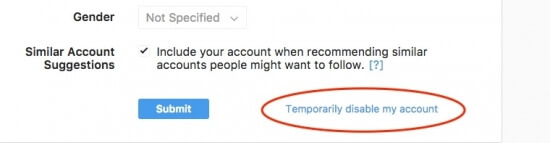
  5. Then, scroll down and click on the Temporarily Disable My Account menu usually in blue.
  6. After entering the new page, don't forget to choose the reason to deactivate temporary Instagram. Then enter your account password again. Automatically the Temporarily Disable Accound button will activate itself.
  7. Then click the Yes button to continue the next command.
  8. You will automatically exit your Instagram account. If you want to reactivate the Instagram account again, you must open it first through the browser.

#2: Disabling Permanent Instagram Account


This method is used only if you want to permanently delete an Instagram account. You cannot restore or reactivate it as in a temporary disable method


  1. As well as deactivating a temporary Instagram account, you also have to login to the Instagram account that was opened in the browser that was on your cellphone.
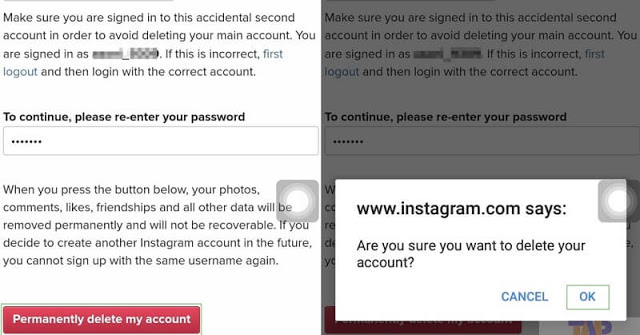
  2. Then you will be faced with the Delete Your Account page , then select your reason for deleting this account, then enter your Instagram account password again.
  3. After you have finished entering your Instagram account password, then click the Permanently delete my account button usually given a red color.
  4. To continue the command, press the OK button to delete your instagaram account.
  5. If you want to try entering again to the Instagram account that you deleted earlier, a notification will usually appear which is usually red.

That's how to disable Instagram accounts that can be done in two ways, temporarily and permanently. But keep in mind, before you delete your Instagram account permanently think again and again to do it.

Conclusion


Deactivating Instagram temporarily will make you unable to open your account for just a few days, whereas if you want to delete your account permanently, you will lose your Instagram account.

Along with photos and videos that you have uploaded, and even worse your username and email cannot be used to create a new Instagram account. So to delete it permanently you need to think about it again. May be useful.
How to Connect a Twitter Account to a Facebook Profile

Now, you can easily connect a Twitter account with a Facebook profile to make it easier for you in many ways, including to make the same post on each platform.

As we know, in contrast to Instagram and WhatsApp services, Twitter is a social media service that is not one-stop with Facebook.

Even so, you can still connect or link accounts from each of these social media services very easily, that is, you only need to enter the Twitter account that you have.

But now, this feature is unfortunately not available anymore due to data abuse cases that had hit Facebook some time ago. Facebook has updated its Platform Policy which ends the automatic ability to make posts from tweets to Facebook profiles.

The Tekno Match team does not yet know whether this will last forever or temporarily. But just in case anyone knows Facebook changes their mind again, you can connect your Twitter account with Facebook profiles by following the steps we reviewed below.

How to Connect a Twitter Account to a Facebook Profile


  • To connect a Twitter account with a Facebook profile you need a browser on the computer
  • First of all, you can open a Twitter account that will be linked through a computer browser
  • After opening, enter Settings, then select the Applications tab
  • On the page, you can choose the Connect to Facebook option
  • In this case, if you have not entered Facebook, you will be asked to enter credentials (username and password) then select the Enter button
  • After that, Twitter will remind you that it will access some information on Facebook, and to continue you just need to press the Continue button as your Facebook Name.
  • Next, you can manage anyone who can see Tweets and Retweets that will be shared on Facebook
  • When you have finished setting it up, you can choose the OK button

Well, it's quite easy not to connect a Twitter account with a Facebook profile. Now, we are just waiting for the policy from Facebook. Hopefully this giant platform will reopen access to Twitter in its policies.

All chat applications definitely require IDs and usernames in their creation, including the line application. Line is the most popular instant messaging application in 42 countries that applies the use of id as account identity.

Not only used for chattingan and social media, Line messenger can also be used for video calls. This Line application is very popular among teenagers, because various kinds of interesting features are offered.

Like various animated stickers, and other features that make chattingan more exciting and expressive.

Can you change Line ID in the same account?


Sometimes some people want to change their Line ID for several reasons. For example, you want to change the brand name of the job, or just replace it with a better LINE ID.

Keep in mind that Line ID cannot be changed once again to make it. But don't worry, there are still ways to get a new ID Line. The solution, like it or not, must register a new Line.

Or if you want to change your ID for an online store or the like, it's better to use a @ line account. However, for line ID requests @ you have to pay / year.

Here's how to easily change Line ID


Log out of Line


Unlike the Facebook and Twitter applications that can be easily and anytime to log out or exit, Line does not allow it to do that.

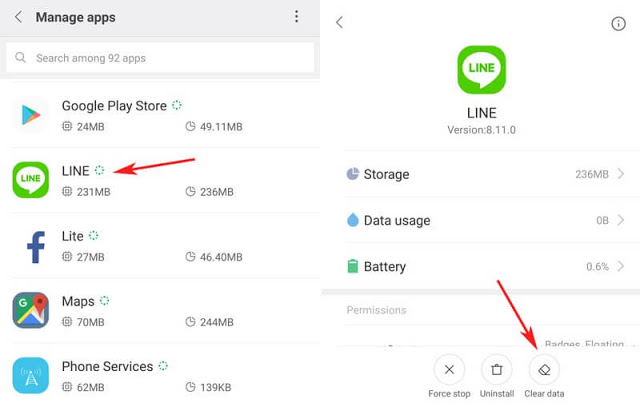
If you want to exit this application you must do "clear data" with the consequences of all the chat and history that is on your cellphone will be lost. Here's how to Logout from the Line:


  • The first step you have to enter the settings menu then select Apps and search for the Line application.
  • Then select clear data
  • After that a notification will appear on your mobile screen, then press "OK"

Register a new Line Account


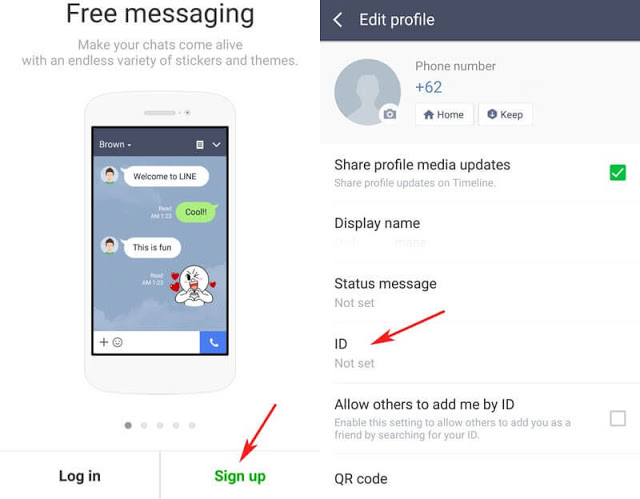
A new display will appear and select Sign Up in the lower right corner.


Enter a new cellphone number


Enter your cellphone number then press the next button. Next you will get an SMS in the form of a verification code that you must enter.

Friendship arrangements


Before you enter your username you should set your friendship settings first.

Enter your username


After you enter the username in your application, then select Register automatically you can use the Line application with the new cellphone number.

  • Press the "Auto Add Friends" button if you don't want your Line ID to add friendship automatically to your friend's cellphone number then just uncheck it.
  • Click the "Allow Others to Add" button if you don't want someone else to save your cellphone number to be added automatically then just delete the check.
  • Then click the back button on your phone.


Create a New ID


You have not received the ID Line automatically even though you have registered. You must make it first:

  • Press on "ID Not Set"
  • You will find "ID Not set" on the next page then press the button again.
  • Enter the ID Line that you want then click the check button.
  • Then the words "This ID can be used" will appear, then press the save button.


Set your new ID


Enter the settings menu located at the top right corner then enter your email address. So a brief review of Tekno match about How to Change ID Line on Android . Enough with the mobile number that is still active to get a verification number to make ID Line without having to change the number on the same cellphone.

Although it comes as an image-based social media, Instagram often displays posts that have captions that are interesting enough to be captured or redistributed.

But unfortunately, this is not easy to do, because Instagram does not feature select text and copy-paste features to copy the writings of Instagram captions.

In this case, you can actually use the screenshot feature to save it in the form of an image. However, for those of you who want to copy it in text form, you can follow the steps below.

How to Copy a Caption on Instagram


  • First of all, you can open an Instagram post that you will copy the caption
  • After that, you can open additional options by tapping the three-point icon located in the top right corner of the post
  • If several options appear, you can choose the Copy Link option to copy the URL address of the post After successfully copying the URL, moving to the browser application that is your mainstay, in this case I prefer to use Google Chrome
  • Paste the URL address that was successfully copied into the provided column followed by pressing the enter button
  • Posts and captions and comments will be displayed on the page, in this case if you are asked to log in, you can ignore it
  • After that, you select the Caption that is displayed by pressing a few moments of the writing until the select text appears (two needle icons)
  • You can move the needle to determine which part you want to copy
  • When finished, release the needle and select the COPY option if it appears
  • If not, you can repeat it to choose which part of the caption to copy

Up to this step, you can now copy the caption from Instagram posts. Furthermore, you can wisely utilize the results of the copy.

You can use the results of the copy of the Instagram caption by using the paste or paste feature that is on your device on some other applications.

Suppose you want to use a caption to upload Instagram posts, you can make uploads as usual. But when filling in the caption, you can press a few moments in the column provided to bring up the PASTE option.

After that, you can choose the option, and upload Instagram posts as usual. But it should be noted, if the caption belongs to someone else, you should ask permission to distribute it again.

In addition, you can save the caption in other text editor applications, in almost the same way, which is to hold a tap on the screen until the PASTE option appears and select that option.