Articles by "OnePlus 5T"
Showing posts with label OnePlus 5T. Show all posts
How to Get OnePlus 5T Face Unlock on Any Android Device

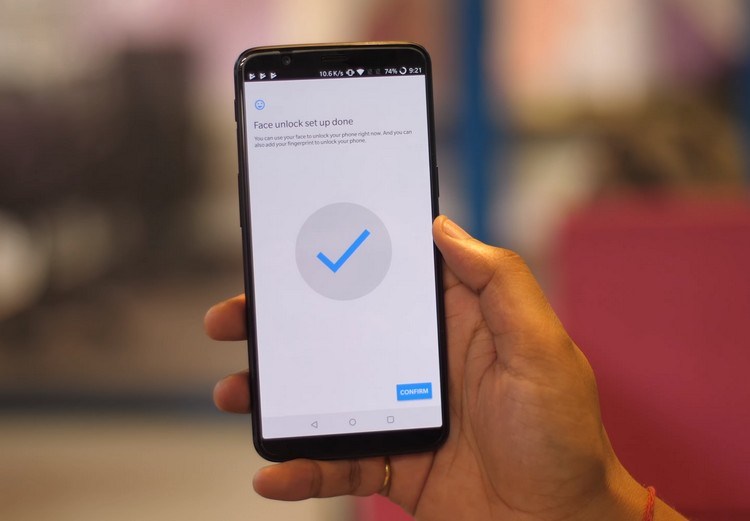
The OnePlus 5T has been released recently and new features have been added. The highlight of the device is definitely the 18: 9 screen and the updated camera, but another notable feature introduced in 5T is Face Unlock. OnePlus tried to challenge the face ID of iPhone X, bringing the fastest Face Unlock to the flagship device. I praise this feature because it shows you how to use the face unlock feature of OnePlus 5T on your Android device.

Get OnePlus 5T Face Unlock on Your Android Device


Note: The following methods use Smart Lock, which was introduced in Android Lollipop (5.0). Therefore, this only works for devices running Android Lollipop or higher (5.0 or higher). You must also set a screen lock with a PIN, pattern, or password. I've tried this method on Moto X Play running Android 7.1.1 and this method worked fine.

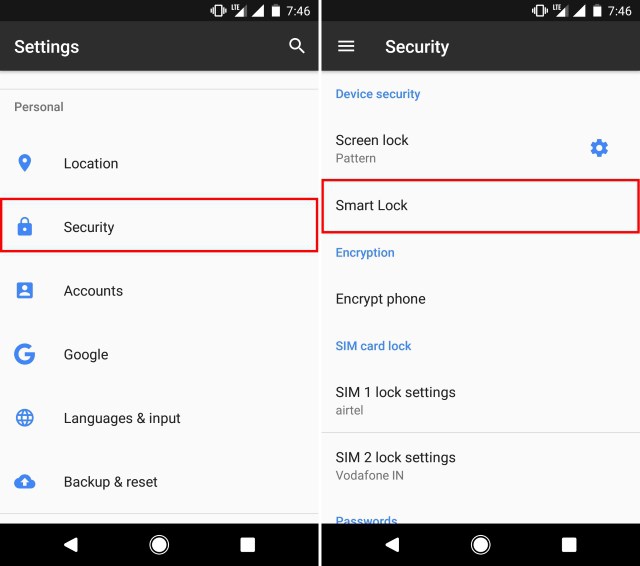
#1: To get started, go to Settings -> Security -> Smart Lock. You must enter your PIN / password to continue.
How to Get OnePlus 5T Face Unlock on Any Android Device

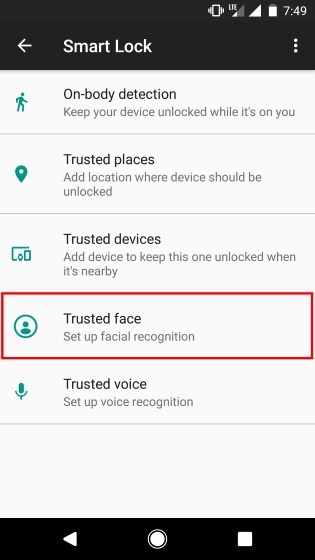
#2: In the Smart Lock settings list, tap Trusted faces.
How to Get OnePlus 5T Face Unlock on Any Android Device

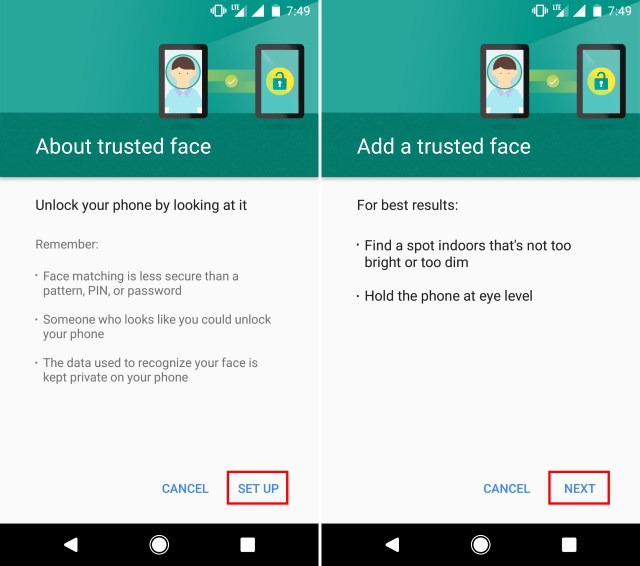
#3: On the next screen, tap "Set up". You'll now see instructions on how to add a trusted face. Press "Next" to continue.
How to Get OnePlus 5T Face Unlock on Any Android Device

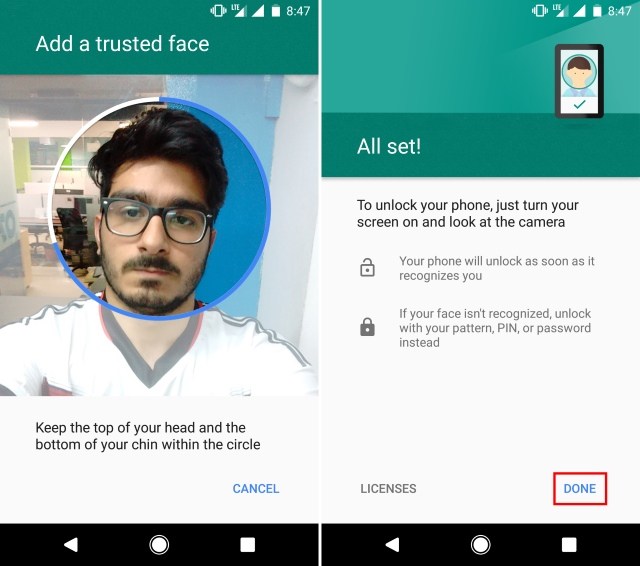
#4: Your device will now begin registering face IDs. Place the face in the circle shown while the device registers the face. After successful completion, the following screen appears.
How to Get OnePlus 5T Face Unlock on Any Android Device

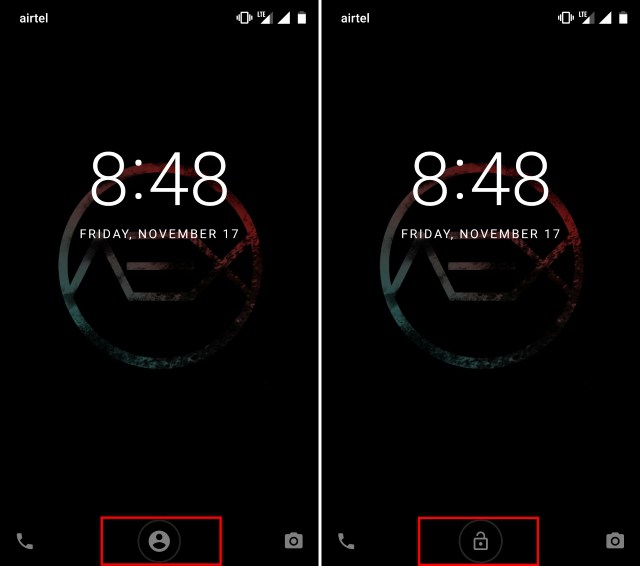
#5: To use face unlocking, place your device face up in locked mode. The icon at the bottom of the screen changes from "Face Recognition" to "Unlock" as shown below.
How to Get OnePlus 5T Face Unlock on Any Android Device

It's not as safe as unlocking your OnePlus 5T, but it's still a great way to get the same functionality on your Android device. Also unlike 5T, which bypasses the lock screen directly, this method only unlocks the device. You must continue to swipe to unlock your device.
OnePlus 5T Doesn't have Wireless Charging Feature and I’m Totally Fine with it

OnePlus 5T, the latest flagship of OnePlus, is nearing its launch date of November 16th. I am as excited as you. The brand has gained a lot of loyal followers with affordable reputation smartphones in just three years. A popular Chinese smartphone manufacturer wants to fix major flaws that OnePlus 5 has been criticized for. While some of the major smart phones launched this year have designs that do not have a bezel, OnePlus has decided to clutter their forehead and jaw, but it will not be a problem anymore. The 5T has a 6-inch all-screen display similar footprint.

After Pete Lau's CEO confirmed that the OnePlus 5T had no wireless charging support, several critics began to hide their fingers in the company. Personally, it works just fine without wireless charging because of the fact that it's significantly slower than wired charging. The dash charger in the box also allows you to charge your OnePlus 5T faster than any other smartphone on the market today. In fact, dashes are a much better option because of the fact that you do not have to spend about $ 50 extra to charge my phone wirelessly.

OnePlus 5T Doesn't have Wireless Charging Feature and I’m Totally Fine with it


In addition, people do not get the overall point of convenience in the crazy "wireless charging". You must plug the cable into the charging stand instead of your smartphone. If you plan to carry it on the go, it is actually much larger than carrying a wall adapter. So, the fact that wireless charging provides convenience is in my opinion not terribly outrageous. I prefer to charge this kind of convenience more quickly. So what do you think of the lack of wireless charging in the OnePlus 5T? Are you a major deal breaker? Or are you satisfied with dash charging? Please let us know if you give us your valuable feedback in the comments section below.